Building a floating draggable panel in Storybook
Vanilla DOM in the parent frame, React subscribers in the iframe, pointer capture for drag.
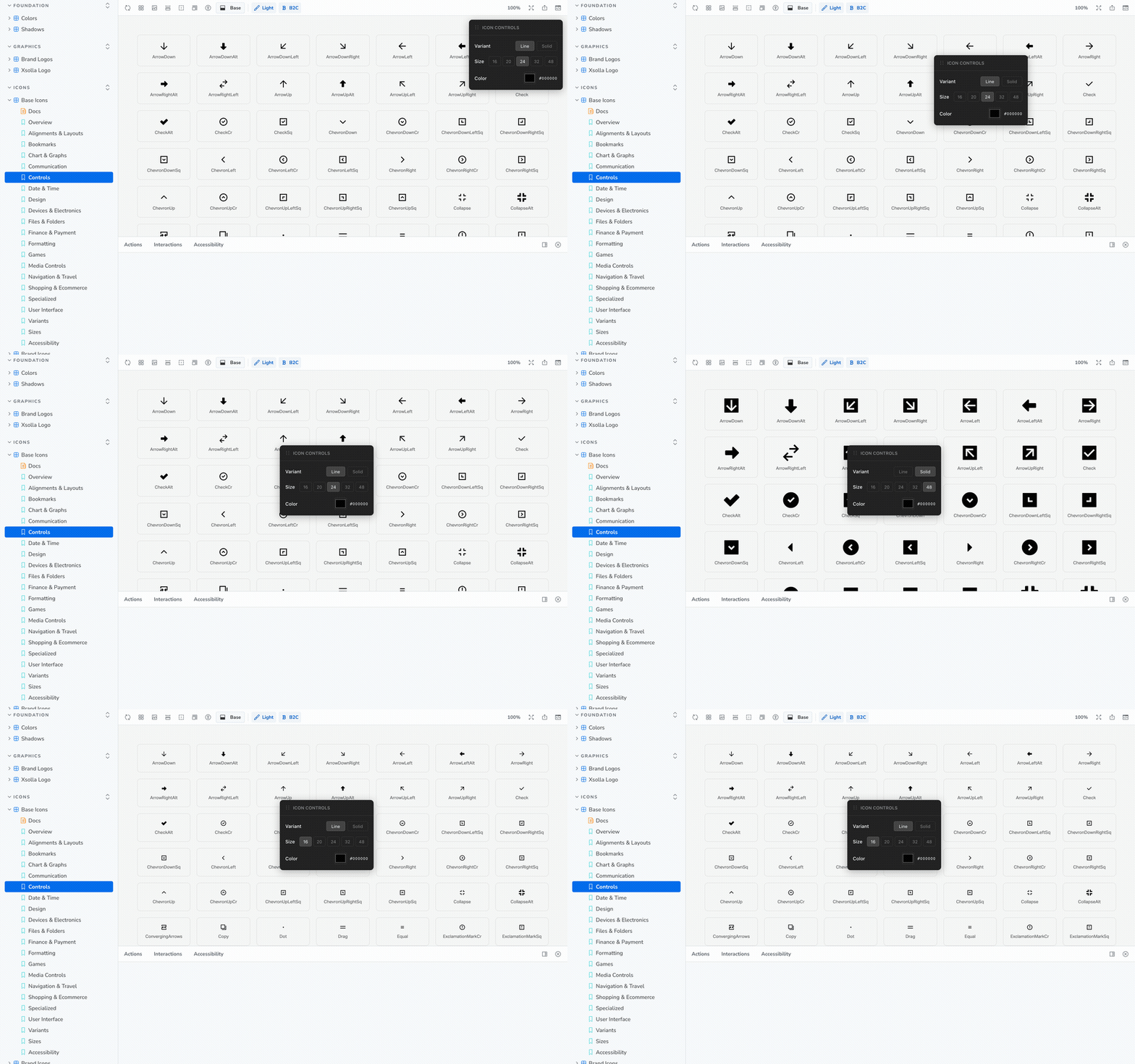
Change variant, size, or color without scrolling back to Storybook Controls. Drag the header if the panel is in the way.
The problem
A large icon gallery can have hundreds of glyphs. To compare Line vs Solid, or 16px vs 48px, you need Storybook Controls at the top of the chrome.
That falls apart on a long gallery:
- Scroll down to the glyph you care about.
- Scroll all the way back up to change variant or size.
- Scroll back down to see if it looks right.
- Repeat for the next icon.
That loop is not usable. A position: fixed React overlay inside the story does not fix it either: Storybook renders the story in an iframe, so the overlay is clipped to the preview, scrolls away with the gallery, and cannot sit over the sidebar or toolbar.
Goal: one floating panel that:
- Stays on screen while you scroll the gallery
- Lives in the parent document (Storybook chrome), not the iframe
- Can be dragged out of the way (including over the sidebar)
- Drives React state in the story without being a React tree itself
- Exists once, even if several stories mount
That means: vanilla DOM in the parent + React subscribers in the iframe.
Architecture in three pieces
┌─ parent document (Storybook manager) ─────────────┐
│  sidebar │  toolbar                               │
│          │  ┌─ Icon Controls (drag me) ─┐         │
│          │  │ Variant  Size  Color      │         │
│          │  └───────────────────────────┘         │
│          │  ┌─ iframe (the story) ─────────────┐  │
│          │  │  useIconControls() → {variant…}  │  │
│          │  │  <Wallet size={size} … />        │  │
│          │  └──────────────────────────────────┘  │
└───────────────────────────────────────────────────┘| Piece | Why it isn't React |
|---|---|
initPanel() | Creates DOM on window.parent.document. React in the iframe cannot portal across that boundary cleanly. |
callbackRefs | Sets of setters. The panel is vanilla; stories are React. The panel calls every subscriber. |
useIconControls() | Each story mounts, registers its setState, and unregisters on unmount. |
Singleton guards: panelInitialized and parentDoc.getElementById(PANEL_ID). Either one is enough to skip a second insert.
1. Reach the parent document
window.parent.document throws if Storybook is on another origin. Wrap it. Same try/catch on cleanup.
let parentDoc: Document;
try {
  parentDoc = window.parent.document;
} catch {
  return; // cross-origin: give up silently
}

if (parentDoc.getElementById(PANEL_ID)) return;
Then append a wrapper to parentDoc.body and a position: fixed panel inside it. Seed position top-right:
let currentX = parentDoc.documentElement.clientWidth - 250;
let currentY = 50;

panel.style.cssText = `
  position: fixed;
  left: ${currentX}px;
  top: ${currentY}px;
  z-index: 5;
`;
left / top are the drag source of truth. Do not mix transform: translate() with those unless you commit to one system.
Markup is a string (innerHTML) because this tree is not React. Give the handle and controls stable ids so you can getElementById after insert.
On the handle, two CSS details that matter later:
user-select: none— dragging must not highlight the titletouch-action: none— touch drag must not scroll the page
2. Drag with pointer capture
Mouse mousemove on document works until the pointer leaves the handle — then events drop and the panel “sticks.” Pointer capture pins all further pointer events to the handle until release, even if the cursor races ahead of the panel.
Drag state lives in the initPanel closure (isDragging, startX/Y, currentX/Y). Not React. Not the DOM. Closure is enough because there is only one panel.
handle.addEventListener("pointerdown", (event: PointerEvent) => {
  event.preventDefault();
  isDragging = true;
  // Offset from panel origin → pointer, so the panel doesn't jump
  startX = event.clientX - currentX;
  startY = event.clientY - currentY;
  handle.style.cursor = "grabbing";
  handle.setPointerCapture(event.pointerId);
});

handle.addEventListener("pointermove", (event: PointerEvent) => {
  if (!isDragging) return;
  currentX = event.clientX - startX;
  currentY = event.clientY - startY;
  panel.style.left = `${currentX}px`;
  panel.style.top = `${currentY}px`;
});

handle.addEventListener("pointerup", (event: PointerEvent) => {
  if (!isDragging) return;
  isDragging = false;
  handle.style.cursor = "grab";
  handle.releasePointerCapture(event.pointerId);
});

handle.addEventListener("lostpointercapture", () => {
  isDragging = false;
  handle.style.cursor = "grab";
});| Line | What it prevents |
|---|---|
preventDefault() | Native drag / text selection fighting you |
start = client - current | Grab-anywhere-on-handle without the panel jumping |
setPointerCapture | Fast mouse-out losing pointermove |
lostpointercapture | Alt-tab, OS steal, or capture lost without pointerup — otherwise isDragging stays true |
Pointer events cover mouse, pen, and touch. You do not need a separate touchmove path. Only the handle is draggable — clicks on controls still work.
3. Bridge vanilla clicks → React state
The panel cannot call setVariant directly: it does not know which story is mounted, and several stories might subscribe.
const callbackRefs = {
  onVariantChange: new Set<(v: IconVariant) => void>(),
  onSizeChange: new Set<(s: number) => void>(),
  onColorChange: new Set<(c: string) => void>(),
};
Set so add/delete is O(1) and the same setter is never registered twice.
Event delegation on the button group (not one listener per button). data-value on each button is the payload. closest("button") so a click on the button’s text still counts.
variantButtons.addEventListener("click", (event) => {
  const button = (event.target as HTMLElement).closest("button");
  if (!button?.dataset.value) return;
  updateButtonStyles(variantButtons, button.dataset.value);
  callbackRefs.onVariantChange.forEach((cb) =>
    cb(button.dataset.value as IconVariant)
  );
});
Color fires on every input while the picker is dragged. That can be hundreds of events/sec. Coalesce to one update per frame:
let colorRaf: number;
colorInput.addEventListener("input", () => {
  colorText.textContent = colorInput.value; // label can update immediately
  cancelAnimationFrame(colorRaf);
  colorRaf = requestAnimationFrame(() => {
    callbackRefs.onColorChange.forEach((cb) => cb(colorInput.value));
  });
});
The hex label updates instantly; React re-renders of the whole icon grid are capped at ~60fps.
4. The hook each story calls
Order matters:
initPanel()— no-op if already there- Subscribe React setters
- On unmount: unsubscribe first, then remove the node and reset
panelInitialized
const useIconControls = () => {
  const [variant, setVariant] = useState<IconVariant>("line");
  const [size, setSize] = useState(24);
  const [color, setColor] = useState("#000000");

  useEffect(() => {
    initPanel();
    callbackRefs.onVariantChange.add(setVariant);
    callbackRefs.onSizeChange.add(setSize);
    callbackRefs.onColorChange.add(setColor);
    return () => {
      callbackRefs.onVariantChange.delete(setVariant);
      callbackRefs.onSizeChange.delete(setSize);
      callbackRefs.onColorChange.delete(setColor);
      cleanupPanel();
    };
  }, []);

  return { variant, size, color };
};
setVariant from useState is a stable function, so it is a valid Set key. If you wrapped it in an inline (v) => setVariant(v), you could never delete the same function.
Story usage is then boring on purpose:
export const Overview: Story = {
  render: () => {
    const { variant, size, color } = useIconControls();
    return <AllIconsGrid size={size} color={color} variant={variant} />;
  },
};
5. Cleanup
Reset the flag so the next story can initPanel() again. If you remove the node but leave panelInitialized === true, the panel never comes back.
Leaving a node in parent.document after the story unmounts is a leak: the next non-icon story would still show the controls.
const cleanupPanel = () => {
  try {
    window.parent.document.getElementById(PANEL_ID)?.remove();
    panelInitialized = false;
  } catch {}
};
Checklist if you copy the pattern
- Parent document, not the iframe —
window.parent.document+ try/catch - Singleton — flag +
getElementById position: fixed+left/topas the only position source- Pointer capture on the handle; handle
lostpointercapture - Offset
clientX - currentXso the panel doesn't jump touch-action: none+user-select: noneon the handle- Callback
Sets, not a single global setter - Subscribe in
useEffect, delete the same function references on cleanup - Throttle noisy inputs with
requestAnimationFrame - Tear down the parent node or it outlives the story
What this is not
- Not a design-system component. Do not publish it.
- Not
ReactDOM.createPortal(…, parentDoc.body)— you can portal across, but then React in the iframe owns a tree in another document. The vanilla approach keeps lifetime explicit. - Not HTML5
draggable="true"— that API is for drag-and-drop data, not moving a panel.